

For many riders, a smartphone has become part of the everyday riding setup.
It can handle navigation, music, calls, weather, and route planning all in one place. Mounting a phone on the handlebars is one of the simplest ways to access these functions while riding.
For a short ride, that may be all you need. But if you commute by motorcycle every day or regularly spend several hours on the road, keeping your phone mounted on the handlebars raises a few practical considerations.
A smartphone is a general-purpose device, not a motorcycle-specific display. When it is mounted on the bike, it can be exposed to continuous vibration, direct sunlight, heat, rain, and road debris. At the same time, the phone's many apps, notifications, and controls can make it tempting to interact with the screen while riding.
CarPlay and Android Auto offer another approach. Your phone continues to provide the connection and services, while a motorcycle display gives you access to navigation, music, calls, and other supported functions.
Why Avoid Frequent Phone Use While Riding?
A single phone interaction may take only a few seconds, but riding already requires your eyes, hands, and attention to manage different tasks.
Checking navigation means looking away from the road to read the screen. Changing a song or entering a destination requires additional interaction. A notification can also become a reason to look at the phone for longer than originally intended.
The National Highway Traffic Safety Administration (NHTSA) describes distracted driving in terms of visual, manual, and cognitive distraction. Looking away from the road, taking your hands away from vehicle controls, or shifting your attention to another task can all affect the attention available for driving. Navigation systems can also involve visual, manual, and cognitive demands.
This does not mean that every glance at a navigation screen is inherently dangerous. A more practical approach is to handle tasks that require more time before setting off. Plan your route, choose your music, and enter destinations in advance. If you need to type, search for a location, or make major changes to a route, pull over first.
For everyday riding, the useful part of a phone is often its ability to provide navigation and connectivity—not the need to use all of its functions while moving.

What Else Should You Consider About Mounting a Phone on Your Motorcycle?
A motorcycle is a very different environment from a pocket, desk, or car cabin. A phone mounted on the handlebars can be exposed directly to sunlight, rain, road debris, and continuous vibration.
These conditions do not mean that every phone will develop problems. The actual effect depends on the phone, motorcycle, mounting position, mount design, and riding conditions. Still, if you regularly keep your phone on the handlebars, a few things are worth considering:
- Vibration: Some smartphone cameras use OIS and autofocus components that may be affected by prolonged exposure to certain high-amplitude vibrations.
- Heat and direct sunlight: Extended exposure to sunlight can increase the thermal load on the battery and internal components.
- Screen temperature: Direct sunlight combined with a bright display can increase screen temperature. Some phones may reduce brightness or activate thermal protection at higher temperatures.
- Rain and moisture: Water resistance varies by phone model and manufacturer specifications, so outdoor use still depends on the actual weather and conditions.
- Dust and mud: Road dust and mud can come into contact with openings such as charging ports and speakers.
- Screen visibility: Strong sunlight can make a phone screen harder to read, particularly when you need to check navigation information quickly.
- Charging connections: Long periods of cable use, along with repeated plugging, unplugging, and cable movement, can add mechanical wear to the connector and cable.
- Battery consumption: Running a bright display, GPS, and mobile data at the same time generally increases power consumption.
Vibration is one area where smartphone manufacturers have provided specific guidance. Apple notes that prolonged exposure to certain high-amplitude vibrations, including those generated by high-powered or large-displacement motorcycle engines, can affect iPhone camera systems. On some models, this may affect OIS and closed-loop autofocus systems.
For someone who only occasionally mounts a phone for navigation, these factors may never become an issue. For riders who use their phones on the handlebars for long periods on a regular basis, however, the riding environment is worth taking into account when choosing how to handle navigation and other connected functions.
How Does CarPlay Work?
The basic idea behind CarPlay is straightforward: your phone provides the connection and services, while a compatible display presents the functions you need.
Apple designed CarPlay to provide access to navigation, phone calls, music, messages, and other supported apps through a compatible vehicle display. Siri can also be used for certain tasks.
Android Auto follows a similar approach, bringing navigation, communication, media, and other supported functions to a compatible display, with voice interaction available for certain tasks.
For motorcycles, the setup can be thought of simply as:
Phone → Wireless connection → Motorcycle display
Navigation, music controls, and calls can appear on the motorcycle display instead of requiring you to look directly at your phone.
The difference is not necessarily about having more features. It is about changing where those features are accessed. Your phone continues to do the underlying work, while the display provides a more dedicated interface for the riding environment.
What Makes a Motorcycle Display Different?
A smartphone is designed to handle almost everything—from social media and messaging to photography, navigation, and entertainment. A motorcycle display has a much narrower purpose: presenting information and connected functions that are useful while riding.
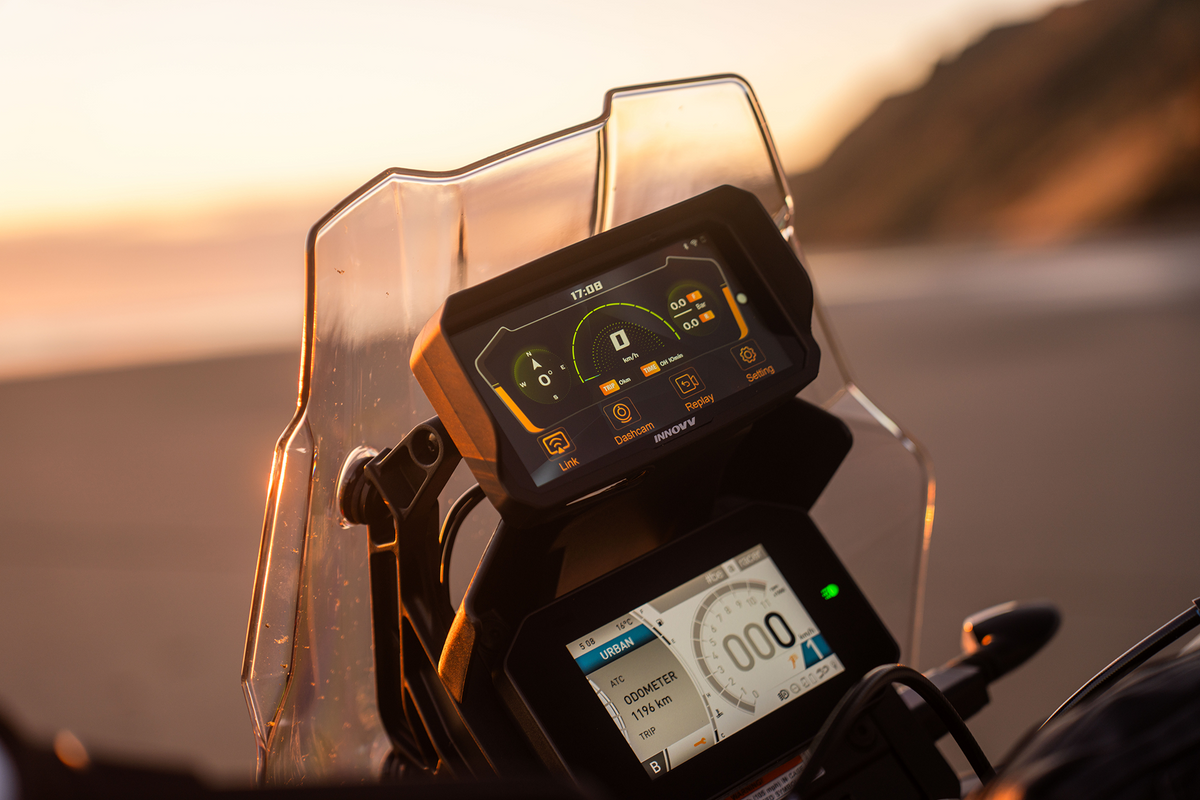
For riders seeking a dedicated screen without risking phone camera damage from engine vibrations, the INNOVV N2 Smart Riding System integrates a 5.99-inch high-brightness display, wireless Apple CarPlay, Android Auto, GPS, and dual 2K front/rear recording.

For riders, the N2 can serve as the primary display for navigation, music, and calls through CarPlay, while also providing dedicated riding functions such as GPS and video recording.
The division of roles is fairly simple: the phone continues to handle connectivity and apps, while the motorcycle display presents the information you need on the road.
That does not mean the display should be used freely while riding. Typing, searching for complex destinations, or making significant route changes are still better handled when stopped.
CarPlay Does Not Replace Good Riding Habits
CarPlay can change how you access phone functions, but it does not remove the need to pay attention to the road.
A simple approach is to set up your navigation and music before leaving. During the ride, focus on the information you actually need. Where supported, voice controls can also be used for certain simple tasks.
Anything that requires extended reading, typing, or selecting should wait until you are safely stopped.
The goal is not to make it possible to do more on a motorcycle. It is to keep useful connected functions available without making the smartphone itself the center of every interaction.

Let Your Phone Handle the Connection, and Let the Display Handle the Ride
For an occasional short ride, a smartphone may be all you need.
For daily commuting, touring, or rides that last several hours, however, keeping a phone permanently mounted on the handlebars is not the only option.
CarPlay and Android Auto provide a straightforward way to divide the roles: the phone continues to provide navigation, communication, and other connected services, while a motorcycle display presents the information you need while riding.
Your phone can still stay connected without having to serve as your motorcycle's dashboard.
It remains your smartphone—just not the screen you need to keep reaching for while you're on the road.
Aktie:
Where Can You Use a Motorcycle Dashcam? Know the Rules